Ship the order, without leaving Infab
Connect your own UPS, FedEx, and DHL accounts, then pack boxes and buy carrier labels at the same time. Your rates, your logo, and real-time tracking updates
Bring the accounts you already have
Connect UPS, FedEx, and DHL Express once. Every label bills to the account you connected at the rates you negotiated, and your logo prints on the label your customer opens the box to see.
Your own accounts. Connect UPS, FedEx, and DHL Express in a few minutes.
Your negotiated rates. Each label bills to the carrier account you connected.
Bill any account. Charge your account, the recipient's, or a customer's third-party account number.
Your brand on the box. Your logo prints on every label the customer receives.
Carrier accounts
Your accounts, your negotiated rates.

UPS
Account ...4021
FedEx
Account ...7788
DHL Express
Account ...5530Acme Machine Works
UPS GROUND
Northrop Grumman
1 Space Park Dr
El Segundo, CA 90245
1Z A3F 9X0 10 2934 88
Pull the shipment straight from the order
The ship-to address, the contents, and the package details come from the order you already track. You are not re-keying into a second system, and the paperwork comes off the same records.
Ship-to from the order. The customer address is already on file.
Contents from the parts. Pick the items and quantities that go in the box.
Documents in one pass. Packing slip and Certificate of Conformance off the order.
One record. Addresses never get copied between tools.
Shipment summary
Updates as you goNorthrop GrummanEl Segundo, CA 90245
3 itemsfrom the order
2 boxes5.4 lb total
2 of 2
Packing slip, CofC
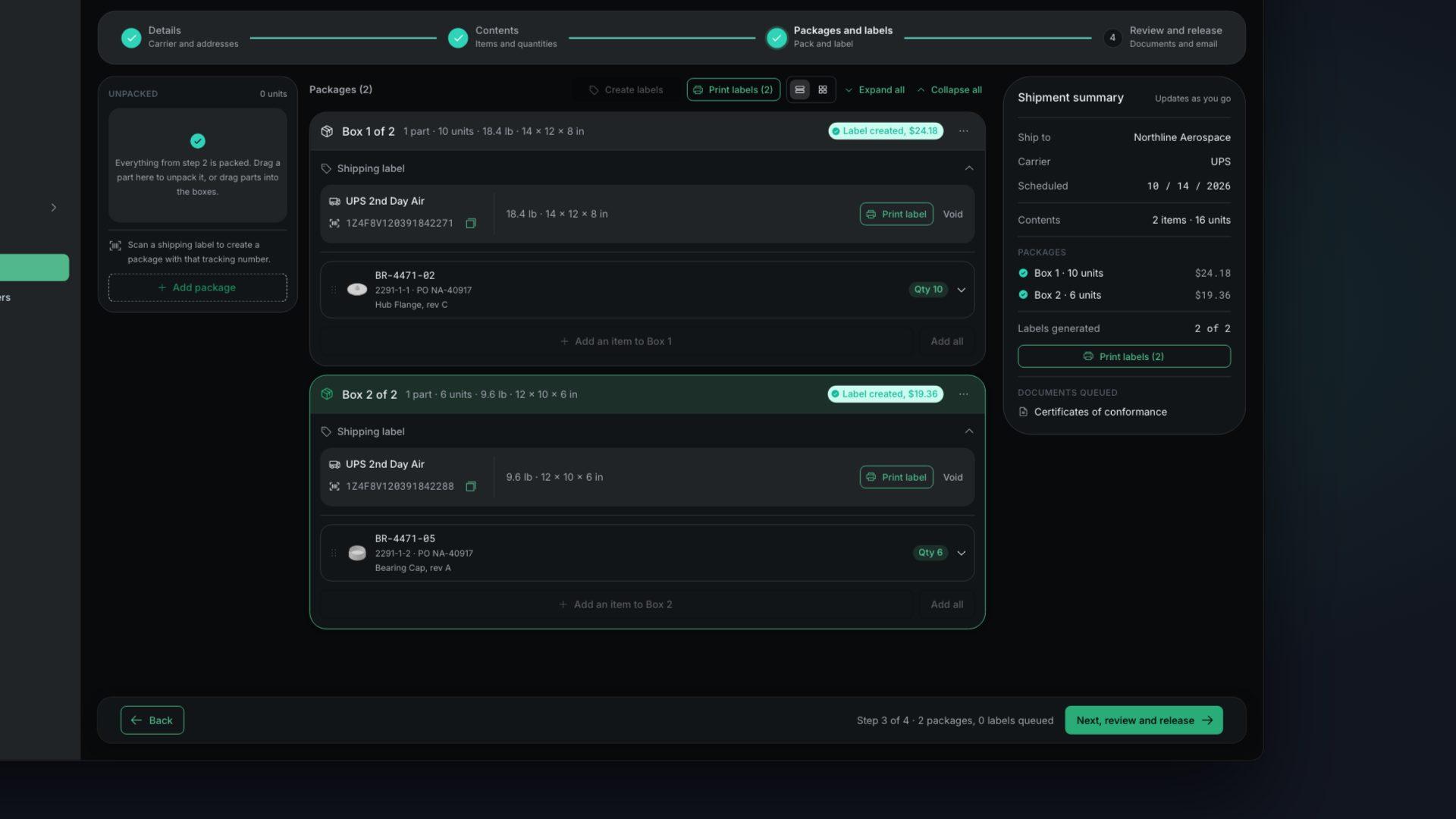
Pack the boxes, buy the label
This is the packing step. Drag items into boxes, pick a service, choose who the label bills to, and buy it. The tracking number lands right there, no tab-hopping required.
Packages (1)
Package 1
Follow every package back on the shipment
Tracking updates in real time on the shipment and in the customer portal, from pickup to delivery. Your team and your customer read the same timeline without checking a carrier website.
Real-time updates. Carrier scans appear as they happen, with no refresh.
On the shipment. Status and the last scan sit with the order they belong to.
Shared with the customer. The portal shows the same tracking to your customer.
Every carrier. UPS, USPS, FedEx, and DHL report back the same way.
1Z A3F 9X0 10 2934 88
UPS Ground · Package 1Out for delivery
El Segundo, CA · Apr 20 · 7:14 AMArrived at facility
Ontario, CA · Apr 20 · 3:02 AMIn transit
Salt Lake City, UT · Apr 19 · 11:40 AMPicked up
Austin, TX · Apr 18 · 4:22 PMLabel created
Austin, TX · Apr 18 · 2:05 PMCommon questions
Which carriers can I create labels with?
UPS, FedEx, and DHL Express. Tracking also covers USPS, so a package moving on any of those carriers reports back to the shipment.
Whose rates do the labels use?
Your own. You connect the UPS, FedEx, and DHL accounts you already hold, and every label bills to those accounts at the rates you have negotiated.
Do I need a separate shipping app or carrier login?
No. You connect a carrier once in Infab and buy labels from the shipment. There is no second dashboard to sign into and no addresses to copy between systems.
Can I bill shipping to my customer's account?
Yes. On every package you choose who pays: your account, the recipient's account, or a third party's. To route freight to a customer's own carrier account, you enter their account number, which is how most drop-ships and customer-routed shipments work.
How is the shipping service chosen?
You pick the service for each package from the ones your carrier offers on that route. The list is filtered to the ship-from and ship-to countries, so an international service never shows up on a domestic shipment.
What does the Shipping add-on cost?
It is a flat $50 a month with 250 label generations included, then $0.20 per label after that. Carrier postage for the labels bills separately to your own UPS, FedEx, and DHL accounts.
How does tracking reach my customer?
Once a label is bought, carrier scans post back to the shipment on their own, from label creation through delivery. The same tracking shows in the customer portal, so your customer follows the package without an email chain.
Get Parts Out the Door Without Switching Tabs
Pack the shipment, buy the carrier label, and hand off tracking from the same place the order already lives
No contracts. Cancel anytime.
Next: give customers a live view in the Customer Portal