
Before you start
2.1Set up your company and addresses
Only users with Is Admin? turned on can open Admin.
Steps
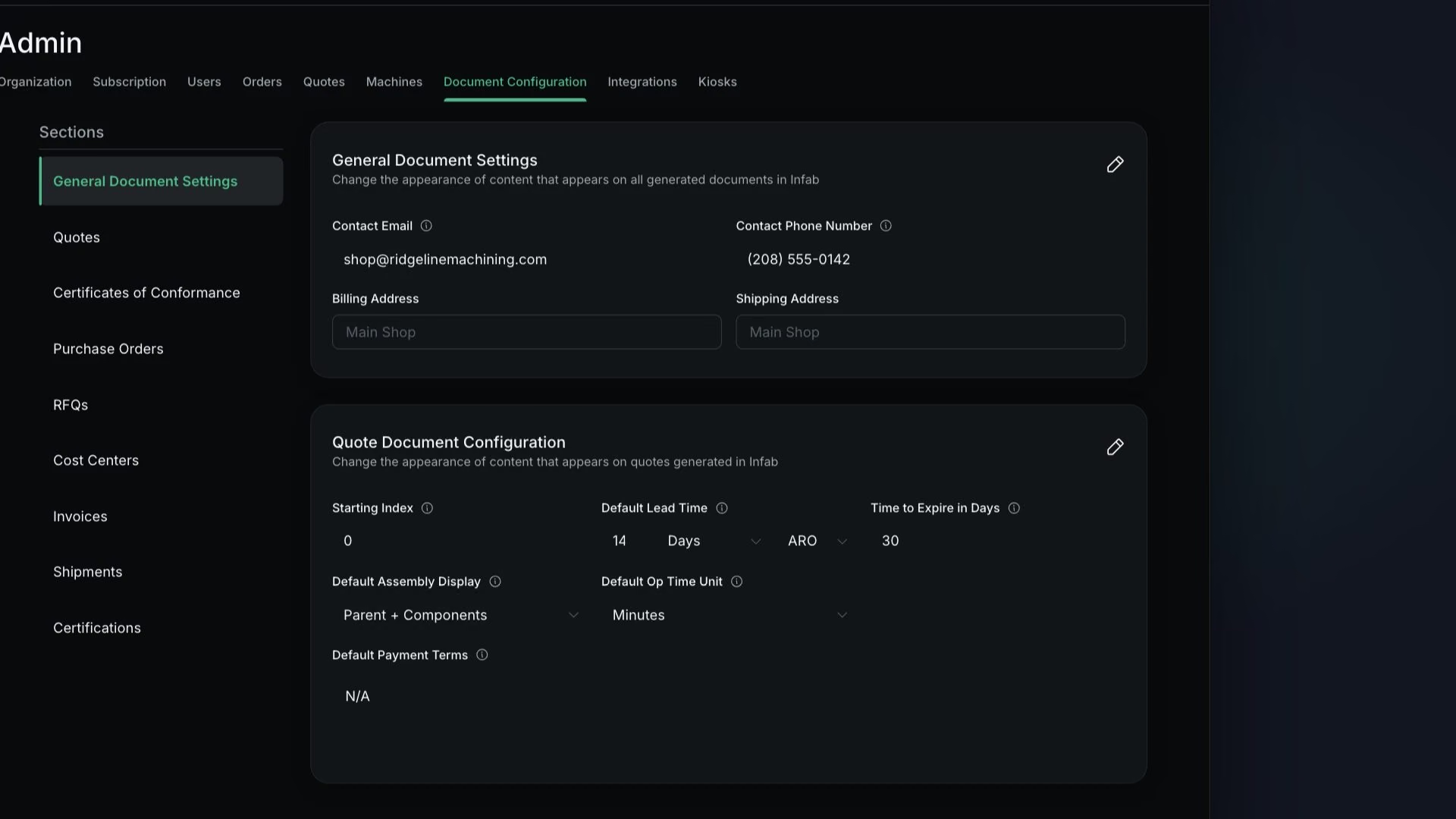
Under General Document Settings, set Contact Email and Contact Phone Number
Pick Billing Address and Shipping Address from your saved addresses, then save
You will see "Document settings updated successfully".
WarningIf the address lists are empty, go back to lesson 2.1 first.
In Quote Document Configuration, set Starting Index
If it is 10, your next quote is Quote 11.
Set Default Lead Time, its unit (Days, Business Days or Weeks) and its basis (ARO or ARM)
Set Time to Expire in Days
The default is 30.
Set Default Assembly Display and Default Op Time Unit
Fill in Default Payment Terms, Default Notes and Terms and Conditions, then save
Note
Contact Email and Contact Phone Number print in the footer of every document you generate.
Tip
Customer-level payment terms, lead time and notes override these defaults (lesson 5.1).
What good looks like
- A test quote PDF shows your logo, footer contact details and terms.